PostgreSQL Window Functions
Summary: in this tutorial, you will learn how to use the PostgreSQL window functions to perform the calculation across a set of rows related to the current row.
Setting up sample tables
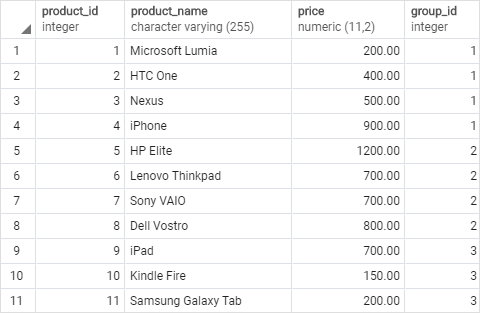
First, create two tables named products and product_groups for the demonstration:

CREATE TABLE product_groups (
	group_id serial PRIMARY KEY,
	group_name VARCHAR (255) NOT NULL
);

CREATE TABLE products (
	product_id serial PRIMARY KEY,
	product_name VARCHAR (255) NOT NULL,
	price DECIMAL (11, 2),
	group_id INT NOT NULL,
	FOREIGN KEY (group_id) REFERENCES product_groups (group_id)
);
Second, insert some rows into these tables:
INSERT INTO product_groups (group_name)
VALUES
	('Smartphone'),
	('Laptop'),
	('Tablet');

INSERT INTO products (product_name, group_id,price)
VALUES
	('Microsoft Lumia', 1, 200),
	('HTC One', 1, 400),
	('Nexus', 1, 500),
	('iPhone', 1, 900),
	('HP Elite', 2, 1200),
	('Lenovo Thinkpad', 2, 700),
	('Sony VAIO', 2, 700),
	('Dell Vostro', 2, 800),
	('iPad', 3, 700),
	('Kindle Fire', 3, 150),
	('Samsung Galaxy Tab', 3, 200);

Introduction to PostgreSQL window functions
The easiest way to understand the window functions is to start by reviewing the aggregate functions. An aggregate function aggregates data from a set of rows into a single row.
The following example uses the AVG() aggregate function to calculate the average price of all products in the products table.
SELECT
	AVG (price)
FROM
	products;
 To apply the aggregate function to subsets of rows, you use the
 GROUP BY clause. The following example returns the average price for every product group.
SELECT
	group_name,
	AVG (price)
FROM
	products
INNER JOIN product_groups USING (group_id)
GROUP BY
	group_name;
 As you see clearly from the output, the
 AVG() function reduces the number of rows returned by the queries in both examples.
Similar to an aggregate function, a window function operates on a set of rows. However, it does not reduce the number of rows returned by the query.
The term window describes the set of rows on which the window function operates. A window function returns values from the rows in a window.
For instance, the following query returns the product name, the price, product group name, along with the average prices of each product group.
SELECT
	product_name,
	price,
	group_name,
	AVG (price) OVER (
	   PARTITION BY group_name
	)
FROM
	products
	INNER JOIN
		product_groups USING (group_id);
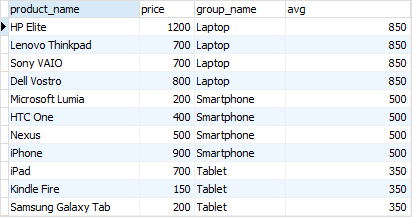 In this query, the
 AVG() function works as a window function that operates on a set of rows specified by the OVER clause. Each set of rows is called a window.
The new syntax for this query is the OVER clause:
AVG(price) OVER (PARTITION BY group_name)
In this syntax, the PARTITION BY distributes the rows of the result set into groups and the AVG() function is applied to each group to return the average price for each.
Note that a window function always performs the calculation on the result set after the JOIN, WHERE, GROUP BY and HAVING clause and before the final ORDER BY clause in the evaluation order.
PostgreSQL Window Function Syntax
PostgreSQL has a sophisticated syntax for window function call. The following illustrates the simplified version:
window_function(arg1, arg2,..) OVER (
   [PARTITION BY partition_expression]
   [ORDER BY sort_expression [ASC | DESC] [NULLS {FIRST | LAST }])
In this syntax:
window_function(arg1,arg2,...)
The window_function is the name of the window function. Some window functions do not accept any argument.
PARTITION BY clause
The PARTITION BY clause divides rows into multiple groups or partitions to which the window function is applied. Like the example above, we used the product group to divide the products into groups (or partitions).
The PARTITION BY clause is optional. If you skip the PARTITION BY clause, the window function will treat the whole result set as a single partition.
ORDER BY clause
The ORDER BY clause specifies the order of rows in each partition to which the window function is applied.
The ORDER BY clause uses the NULLS FIRST or NULLS LAST option to specify whether nullable values should be first or last in the result set. The default is NULLS LAST option.
frame_clause
The frame_clause defines a subset of rows in the current partition to which the window function is applied. This subset of rows is called a frame.
If you use multiple window functions in a query:
SELECT
    wf1() OVER(PARTITION BY c1 ORDER BY c2),
    wf2() OVER(PARTITION BY c1 ORDER BY c2)
FROM table_name;
you can use the WINDOW clause to shorten the query as shown in the following query:
SELECT
   wf1() OVER w,
   wf2() OVER w,
FROM table_name
WINDOW w AS (PARTITION BY c1 ORDER BY c2);
It is also possible to use the WINDOW clause even though you call one window function in a query:
SELECT wf1() OVER w
FROM table_name
WINDOW w AS (PARTITION BY c1 ORDER BY c2);
PostgreSQL window function List
The following table lists all window functions provided by PostgreSQL. Note that some aggregate functions such as AVG(), MIN(), MAX(), SUM(), and COUNT() can be also used as window functions.
| Name | Description |
|---|---|
| CUME_DIST | Return the relative rank of the current row. |
| DENSE_RANK | Rank the current row within its partition without gaps. |
| FIRST_VALUE | Return a value evaluated against the first row within its partition. |
| LAG | Return a value evaluated at the row that is at a specified physical offset row before the current row within the partition. |
| LAST_VALUE | Return a value evaluated against the last row within its partition. |
| LEAD | Return a value evaluated at the row that is offset rows after the current row within the partition. |
| NTILE | Divide rows in a partition as equally as possible and assign each row an integer starting from 1 to the argument value. |
| NTH_VALUE | Return a value evaluated against the nth row in an ordered partition. |
| PERCENT_RANK | Return the relative rank of the current row (rank-1) / (total rows – 1) |
| RANK | Rank the current row within its partition with gaps. |
| ROW_NUMBER | Number the current row within its partition starting from 1. |
The ROW_NUMBER(), RANK(), and DENSE_RANK() functions
The ROW_NUMBER(), RANK(), and DENSE_RANK() functions assign an integer to each row based on its order in its result set.
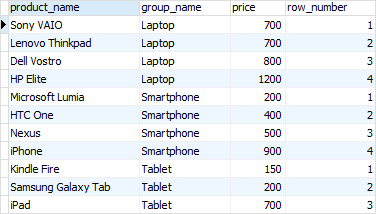
The ROW_NUMBER() function assigns a sequential number to each row in each partition. See the following query:
SELECT
	product_name,
	group_name,
	price,
	ROW_NUMBER () OVER (
		PARTITION BY group_name
		ORDER BY
			price
	)
FROM
	products
INNER JOIN product_groups USING (group_id);
 The
The RANK() function assigns ranking within an ordered partition. If rows have the same values, the RANK() function assigns the same rank, with the next ranking(s) skipped.
See the following query:
SELECT
	product_name,
	group_name,
  price,
	RANK () OVER (
		PARTITION BY group_name
		ORDER BY
			price
	)
FROM
	products
INNER JOIN product_groups USING (group_id);
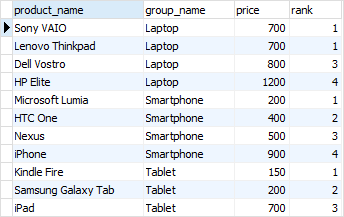 In the laptop product group, both
 Sony VAIO and Lenovo Thinkpad products have the same price, therefore, they receive the same rank 1. The next row in the group is Dell Vostro that receives the rank 3 because the rank 2 is skipped.
Similar to the RANK() function, the DENSE_RANK() function assigns a rank to each row within an ordered partition, but the ranks have no gap. In other words, the same ranks are assigned to multiple rows and no ranks are skipped.
SELECT
	product_name,
	group_name,
	price,
	DENSE_RANK () OVER (
		PARTITION BY group_name
		ORDER BY
			price
	)
FROM
	products
INNER JOIN product_groups USING (group_id);
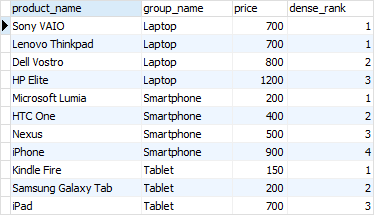 Within the laptop product group, rank 1 is assigned twice to
 Sony VAIO and Lenovo Thinkpad. The next rank is 2 assigned to Dell Vostro.
The FIRST_VALUE and LAST_VALUE functions
The FIRST_VALUE() function returns a value evaluated against the first row within its partition, whereas the LAST_VALUE() function returns a value evaluated against the last row in its partition.
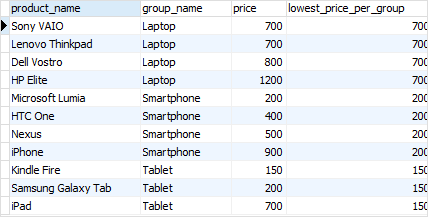
The following statement uses the FIRST_VALUE() to return the lowest price for every product group.
SELECT
	product_name,
	group_name,
	price,
	FIRST_VALUE (price) OVER (
		PARTITION BY group_name
		ORDER BY
			price
	) AS lowest_price_per_group
FROM
	products
INNER JOIN product_groups USING (group_id);
 The following statement uses the
 LAST_VALUE() function to return the highest price for every product group.
SELECT
	product_name,
	group_name,
	price,
	LAST_VALUE (price) OVER (
		PARTITION BY group_name
		ORDER BY
			price RANGE BETWEEN UNBOUNDED PRECEDING
		AND UNBOUNDED FOLLOWING
	) AS highest_price_per_group
FROM
	products
INNER JOIN product_groups USING (group_id);
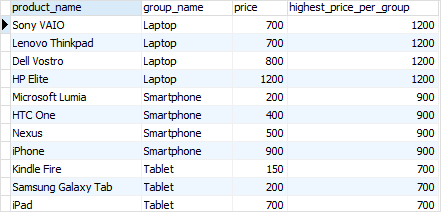 Notice that we added the frame clause
 RANGE BETWEEN UNBOUNDED PRECEDING AND UNBOUNDED FOLLOWING because by default the frame clause is RANGE BETWEEN UNBOUNDED PRECEDING AND CURRENT ROW.
The LAG and LEAD functions
The LAG() function has the ability to access data from the previous row, while the LEAD() function can access data from the next row.
Both LAG() and LEAD() functions have the same syntax as follows:
LAG  (expression [,offset] [,default]) over_clause;
LEAD (expression [,offset] [,default]) over_clause;
In this syntax:
expression– a column or expression to compute the returned value.offset– the number of rows preceding (LAG)/ following (LEAD) the current row. It defaults to 1.default– the default returned value if theoffsetgoes beyond the scope of the window. ThedefaultisNULLif you skip it.
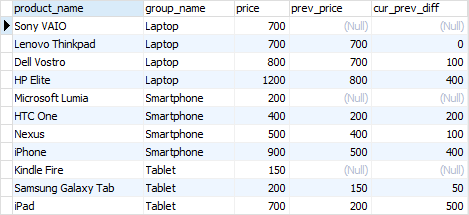
The following statement uses the LAG() function to return the prices from the previous row and calculates the difference between the price of the current row and the previous row.
SELECT
	product_name,
	group_name,
	price,
	LAG (price, 1) OVER (
		PARTITION BY group_name
		ORDER BY
			price
	) AS prev_price,
	price - LAG (price, 1) OVER (
		PARTITION BY group_name
		ORDER BY
			price
	) AS cur_prev_diff
FROM
	products
INNER JOIN product_groups USING (group_id);
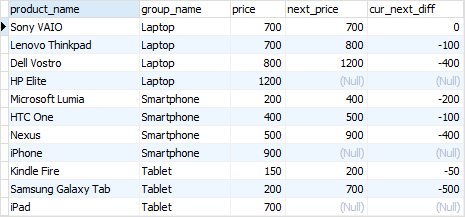
 The following statement uses the
 LEAD() function to return the prices from the next row and calculates the difference between the price of the current row and the next row.
SELECT
	product_name,
	group_name,
	price,
	LEAD (price, 1) OVER (
		PARTITION BY group_name
		ORDER BY
			price
	) AS next_price,
	price - LEAD (price, 1) OVER (
		PARTITION BY group_name
		ORDER BY
			price
	) AS cur_next_diff
FROM
	products
INNER JOIN product_groups USING (group_id);
 In this tutorial, we have introduced you to the PostgreSQL window functions and shown you some examples of using them to query data.